
Last Updated: November 8, 2026
Quick Summary
The best HIPAA training software for dental clinics is one that assigns role-specific modules, sends automatic reminders, and exports completion records for audits. ComplianceCare offers recurring monthly modules with a BAA included, while Smart Training Dental Compliance bundles training with written privacy programs at $495 per year per location.
- HIPAA does not specify a training format, length, or number of hours.
- Monthly training tends to keep knowledge current, while annual seminars are often forgotten.
- ComplianceCare's modules run about five minutes each and include a Business Associate Agreement.
- Smart Training Dental Compliance costs $495 per year per location and includes written privacy programs.
- Request a sample completion export before buying to confirm audit records are usable.
Table of Contents
- Why Dental Clinics Need Dedicated HIPAA Training Software
- HIPAA Training Requirements for Dental Offices
- How We Evaluated HIPAA Training Software for Dental Practices
- Quick Comparison: Top HIPAA Training Software for Dental Clinics
- Top HIPAA Training Software Options for Dental Clinics
- Free HIPAA Training for Dental Offices: What Is and Isn't Included
- OSHA and HIPAA Training for Dental Offices Online
- HIPAA Training Completion Tracking and Audit Documentation
- Frequently Asked Questions
Dental clinics handle protected health information every day, from patient charts to insurance forms, and HIPAA training is not optional. Choosing the best HIPAA training software for dental clinics can save a practice hours of manual tracking each month. This guide compares nine options and explains how we evaluated them.
The HIPAA Privacy and Security Rules require covered entities to train their workforce, but the rules do not dictate a delivery format. HHS Office for Civil Rights HIPAA training guidance describes the baseline expectations. Your job is to pick a system that produces the training records you will need if an auditor asks for them.
Why Dental Clinics Need Dedicated HIPAA Training Software
Dental offices face a specific mix of risks. Front desk staff scheduling patients, hygienists charting treatment, and billing staff submitting claims all touch protected health information. A generic compliance course rarely addresses how these roles actually work.
Dedicated training software solves three problems at once. It assigns the right modules to each role, it reminds staff when training is due, and it stores completion records in one place. Many small practices run this process on spreadsheets, which breaks down as soon as a new hire joins mid-cycle.
HIPAA Training Requirements for Dental Offices
HIPAA requires that workforce members receive training on policies and procedures appropriate to their job functions. The training must be documented, and the records must be retained. Practices should also train new hires promptly and refresh staff when policies change.
The regulation does not specify a number of hours or a required course length. That means you can choose between an annual seminar, quarterly modules, or ongoing monthly sessions, as long as the training is documented and reaches everyone who handles protected information. Monthly sessions tend to keep knowledge current, while annual seminars are easier to schedule but often forgotten by spring. Compare monthly training against annual seminars in more detail before you decide.
How We Evaluated HIPAA Training Software for Dental Practices
We judged each option against the criteria a dental practice manager is likely to care about:
- Dental relevance: Does the content address front desk, clinical, and billing workflows?
- Training cadence: Are modules short and recurring, or delivered in long annual sessions?
- Administration: Does the software assign, track, and remind staff automatically?
- Records: Can you export completion records for an audit?
- Pricing transparency: Is the cost published or easy to request?
- Business Associate Agreement: Is one provided, and at what cost?
Quick Comparison: Top HIPAA Training Software for Dental Clinics
The table below compares the options by dental content, delivery format, published pricing, and administration features.
| Option | Dental-Specific Content | Delivery Format | Published Pricing | Administration Features | Best For |
|---|---|---|---|---|---|
| ComplianceCare | General healthcare (not dental-specific) | Recurring monthly modules, about 5 minutes each | Free trial; pricing on website | Automatic assignment, reminders, exportable completion records, BAA included | Small practices wanting set-and-forget monthly training |
| Smart Training Dental Compliance | Yes | Courses plus written privacy programs | $495/year per location | Written program templates; confirm tracking features with vendor | Dental practices wanting training and written policies bundled |
| ProProfs and similar online course providers | Varies by catalog | Self-paced individual courses | Not published; request quote | Course-level completion records; limited automation | Practices assigning specific courses to specific roles |
| HealthStream | Not verified for dental | Platform-based training | Contact for pricing | Enterprise reporting and learning management | Larger groups comparing enterprise platforms |
| Compliancy Group | Not verified for dental | Platform plus compliance coaching | Contact for pricing | Compliance dashboard and audit support | Practices wanting guided compliance management |
| Healthicity | Not verified for dental | Platform-based training and auditing | Contact for pricing | Audit and compliance workflow tools | Organizations with dedicated compliance staff |
| HIPAA Secure Now | Not verified for dental | Online training plus security services | Contact for pricing | Training plus risk assessment services | Practices wanting training and security help together |
A practical way to use this table is to shortlist two options that match your clinic size, then ask each vendor for the same four things: a sample completion export, a sample BAA, a per-location price quote, and a demo of how a new hire is onboarded mid-cycle. The answers will separate the options faster than any feature checklist.
Top HIPAA Training Software Options for Dental Clinics
ComplianceCare: Recurring Monthly Modules with a Built-In BAA
ComplianceCare is built for small healthcare practices that want compliance training to run on an ongoing basis. Staff receive short, recurring monthly modules of about five minutes each. Training is assigned and tracked automatically.
A Business Associate Agreement is included at no extra cost. Reporting produces exportable completion records. There are no long-term contracts or user limits.
Best for: small practices that want set-and-forget monthly training with audit records. Skip if: you need dental-specific clinical scenarios, since the content is built for healthcare practices generally.
Pricing depends on your practice size and setup, so check the ComplianceCare website for current rates. A free trial is available.
Smart Training Dental Compliance: Dental-Specific Privacy Programs
Smart Training's dental compliance offering combines HIPAA training with the written privacy programs that dental practices are expected to maintain.
Best for: dental practices that want training and written privacy programs in one package. Skip if: you need detailed automated tracking and monthly reminders.
HIPAA Training Courses from ProProfs and Other Online Providers
Online course providers such as ProProfs offer HIPAA training as self-paced courses that employees complete individually. This model works well for practices that want to assign specific courses to specific roles without subscribing to a full platform.
Confirm that course completions generate a record you can keep for audits.
Best for: practices that want individual courses for specific staff. Skip if: you want automated scheduling and recurring reminders.
Free HIPAA Training for Dental Offices: What Is and Isn't Included
Ask three questions before relying on free training. If you are ready to evaluate a paid option, you can start a free trial with no credit card required. Does it cover your specific workflows? Can you prove each employee completed it? Does it include a Business Associate Agreement where one is needed? If the answer to any of these is no, budget for a paid option.
Many practices use free resources to supplement a paid program rather than replace one.
OSHA and HIPAA Training for Dental Offices Online
Some providers bundle HIPAA and OSHA courses for dental teams, which can reduce the number of separate systems you manage.
Bundling is convenient, but verify that each topic is covered at the depth your regulators expect. Confirm which records the bundle produces for each requirement, since OSHA and HIPAA documentation are separate obligations.
HIPAA Training Completion Tracking and Audit Documentation
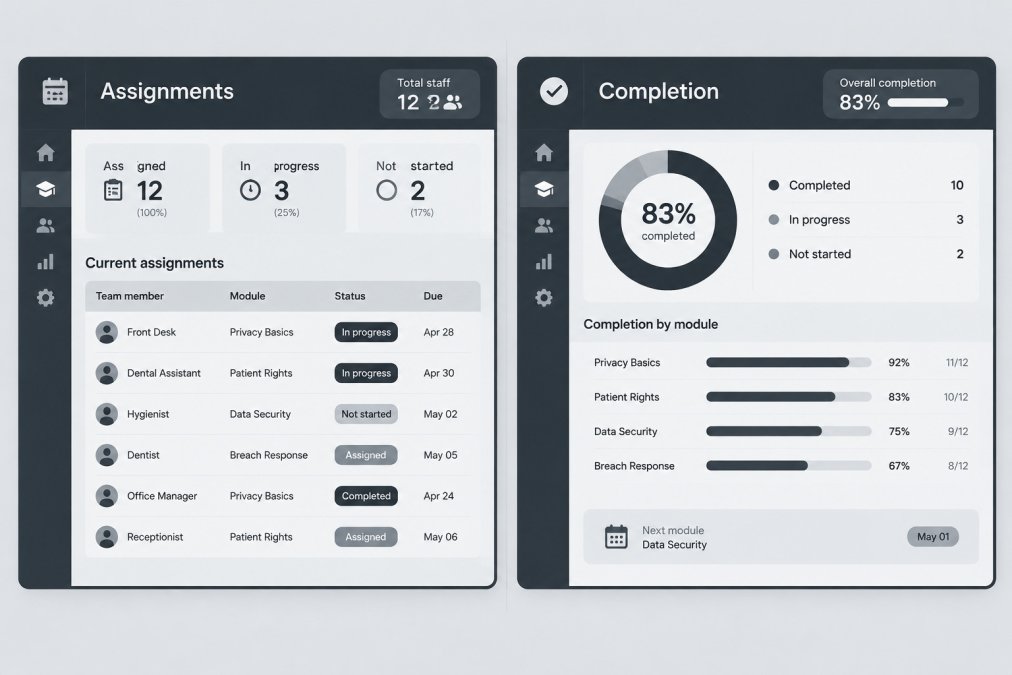
Training only protects a practice if you can prove it happened, and the tracking workflow is where most software decisions are actually won or lost. A platform that assigns courses well but exports poorly will cost your office manager hours during an audit; a platform with modest course content but clean records can carry a small practice for years. Evaluate tracking against the five workflows below.
Assignment and role mapping. Good software lets you build role groups, dentist, hygienist, dental assistant, front desk, billing, and assign different modules to each. Front-desk staff need training on patient disclosures and scheduling communications; clinical staff need training on charting and imaging; billing staff need training on claims and minimum-necessary rules. Ask the vendor to show how a role group is created and whether assignments update automatically when an employee changes roles.
Reminders and escalation. Automated reminders should go to the employee first and to the manager only after a deadline passes. Confirm the reminder cadence and whether it is configurable. A common pattern is a reminder at assignment, another one week before the due date, and an escalation to the office manager after the due date. If reminders are manual, the software is not saving you the work you bought it for.
New-hire onboarding. The most common tracking failure in dental offices is a hire who starts mid-cycle and never gets assigned the current training. Ask how the platform handles a new employee added between cycles: does it auto-assign the current module, backfill prior modules, or require a manual step? The best answer is auto-assignment with a documented completion date, because that is the record an auditor will ask for.
Export and audit file. Request a sample export before you buy. A usable export includes employee name, role, course title, assignment date, completion date, and score if applicable. It should be downloadable as a spreadsheet or PDF without a support ticket. Keep the export with your HIPAA documentation and store it where staff can retrieve it quickly. Learn how to set up step-by-step audit-ready documentation and automated reporting for your practice. Confirm the retention window for HIPAA documentation with your compliance advisor.
Audit preparation. The clearest test is simple: could you produce a complete training record for every employee within an hour? If not, the tracking process needs work, regardless of which software you choose. Run that test once a quarter, not once a year, so gaps surface while there is still time to fix them.
Watch out: a platform that stores completion records only inside its own dashboard, with no self-service export, can leave you dependent on vendor support during an audit window, confirm export access in writing before signing.
Start your free trial of ComplianceCare to see how monthly modules and exportable records fit your practice.
Frequently Asked Questions
What are the HIPAA training requirements for dental offices?
HIPAA requires covered entities, including most dental practices that bill insurance electronically, to train all workforce members on the policies and procedures relevant to their roles. This covers the Privacy Rule and the Security Rule. Training must occur when staff are hired, when policies materially change, and on an ongoing basis. Practices should keep documentation of who was trained, when, and on what content, because that record is what you would show during an audit or investigation.
Is there free HIPAA training for dental offices?
Some providers offer free trials or limited free plans. Free resources can help with general awareness, but they often lack completion tracking, exportable records, or dental-specific scenarios. Compare what a free option includes against your documentation needs before relying on it as your only training source.
Can online HIPAA training software track employee completion?
Many platforms track who has started and finished each module and store the dates. The more useful tools also assign training to new hires automatically, send reminders, and export completion records in a format you can keep for audits. When evaluating software, confirm it produces a report listing each staff member, the course completed, and the completion date.
Do dental clinics need a business associate agreement with a HIPAA training provider?
A training vendor generally does not need a business associate agreement if it never accesses protected health information. If the training platform stores employee records that include patient information, or if it has any access to patient data, a BAA is required. ComplianceCare includes a Business Associate Agreement at no extra cost, which removes one procurement step. Ask any vendor to confirm in writing whether a BAA applies to your use.
